Powerful data science visualization with Python and Matplotlib
Learn about Python's powerful capabilities for creating professional strip charts
Python is a high-level, interpreted programming language known for its simplicity and versatility. With libraries like Matplotlib, NumPy, and Pandas, it's become the go-to language for data science and scientific computing.
Why Python is the preferred choice for data science strip chart applications
Python and its libraries are completely free and open source, making it accessible to individuals, startups, and educational institutions without licensing costs.
Extensive library ecosystem including Matplotlib for plotting, NumPy for numerical computing, Pandas for data manipulation, and SciPy for scientific computing.
Complete control over every aspect of the strip chart, from data processing to visual styling, allowing for highly customized and professional visualizations.
Python's simple syntax and extensive documentation make it easy to learn, even for beginners with no programming experience.
Runs on Windows, macOS, and Linux, ensuring your strip chart applications work consistently across different operating systems.
Large and active community providing extensive documentation, tutorials, and support for data visualization and scientific computing.
Follow these detailed steps to create professional strip charts in Python
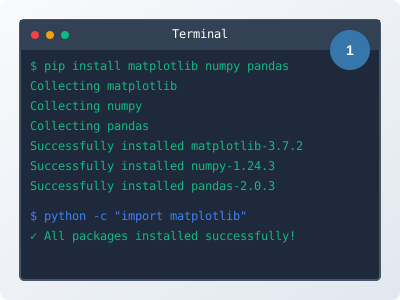
Install the necessary Python libraries for creating strip charts. The main libraries you'll need are Matplotlib, NumPy, and optionally Pandas for data manipulation.
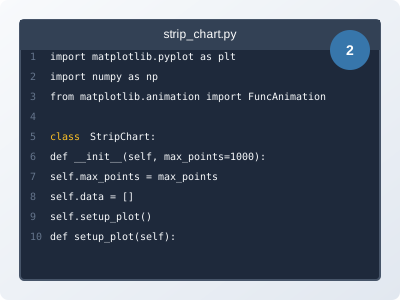
pip install matplotlib numpy pandaspython -c "import matplotlib"Create a Python class to handle the strip chart functionality. This class will manage data storage, chart updates, and animation.
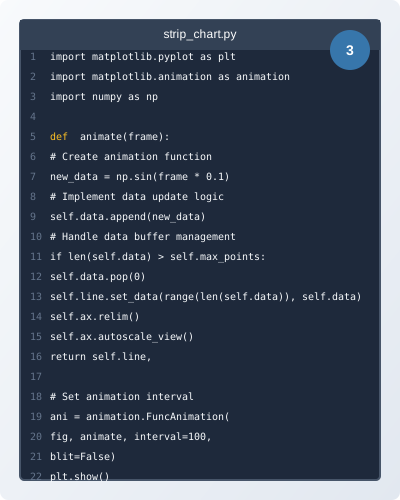
Use Matplotlib's animation module to create real-time updates for the strip chart.
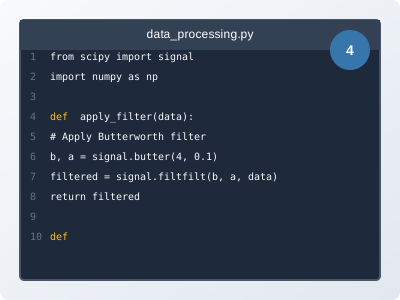
Enhance your strip chart with data processing capabilities using NumPy and SciPy. Add filtering, statistical analysis, and real-time calculations.
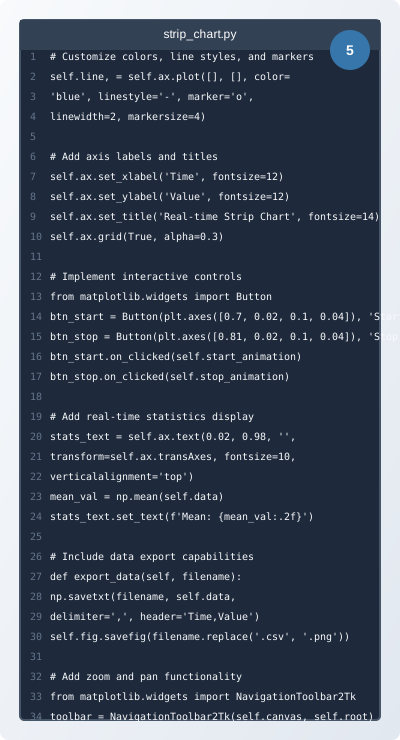
Customize the chart appearance, add interactive controls, and implement features like zoom, pan, and data export for a professional application.
Practical code examples and real-world applications for Python strip charts
import matplotlib.pyplot as plt
import matplotlib.animation as animation
import numpy as np
class StripChart:
def __init__(self, max_points=1000):
self.max_points = max_points
self.data = []
self.fig, self.ax = plt.subplots()
self.line, = self.ax.plot([], [], 'b-')
def update(self, new_data):
self.data.append(new_data)
if len(self.data) > self.max_points:
self.data.pop(0)
self.line.set_data(range(len(self.data)), self.data)
self.ax.relim()
self.ax.autoscale_view()
def animate(self, frame):
# Generate new data point
new_data = np.sin(frame * 0.1) + np.random.normal(0, 0.1)
self.update(new_data)
# Create and run strip chart
chart = StripChart()
ani = animation.FuncAnimation(chart.fig, chart.animate,
interval=100, blit=False)
plt.show()
This basic implementation creates a simple strip chart using Matplotlib's animation module. The StripChart class manages data storage and updates, while the animation function generates new data points and updates the display.
import matplotlib.pyplot as plt
import matplotlib.animation as animation
import numpy as np
class MultiChannelStripChart:
def __init__(self, channels=3, max_points=1000):
self.channels = channels
self.max_points = max_points
self.data = [[] for _ in range(channels)]
self.fig, self.ax = plt.subplots()
self.lines = []
colors = ['b-', 'r-', 'g-', 'm-', 'c-']
for i in range(channels):
line, = self.ax.plot([], [], colors[i % len(colors)],
label=f'Channel {i+1}')
self.lines.append(line)
self.ax.legend()
def update(self, new_data):
for i, value in enumerate(new_data):
self.data[i].append(value)
if len(self.data[i]) > self.max_points:
self.data[i].pop(0)
for i, line in enumerate(self.lines):
line.set_data(range(len(self.data[i])), self.data[i])
self.ax.relim()
self.ax.autoscale_view()
def animate(self, frame):
# Generate multi-channel data
new_data = [np.sin(frame * 0.1 + i) + np.random.normal(0, 0.1)
for i in range(self.channels)]
self.update(new_data)
# Create and run multi-channel strip chart
chart = MultiChannelStripChart(channels=3)
ani = animation.FuncAnimation(chart.fig, chart.animate,
interval=100, blit=False)
plt.show()
This example shows how to create a multi-channel strip chart that can display multiple data streams simultaneously. Each channel has its own color and can be independently updated.
import matplotlib.pyplot as plt
import matplotlib.animation as animation
import numpy as np
from scipy import signal
class AdvancedStripChart:
def __init__(self, max_points=1000):
self.max_points = max_points
self.raw_data = []
self.filtered_data = []
self.fig, (self.ax1, self.ax2) = plt.subplots(2, 1, figsize=(10, 8))
# Raw data plot
self.line1, = self.ax1.plot([], [], 'b-', alpha=0.7, label='Raw')
self.line2, = self.ax1.plot([], [], 'r-', label='Filtered')
self.ax1.legend()
self.ax1.set_title('Real-time Data with Filtering')
# Statistics plot
self.line3, = self.ax2.plot([], [], 'g-', label='Mean')
self.ax2.legend()
self.ax2.set_title('Statistical Analysis')
def update(self, new_data):
self.raw_data.append(new_data)
if len(self.raw_data) > self.max_points:
self.raw_data.pop(0)
# Apply low-pass filter
if len(self.raw_data) > 10:
filtered = signal.savgol_filter(self.raw_data,
min(11, len(self.raw_data)//2*2+1), 3)
self.filtered_data = filtered.tolist()
# Calculate statistics
if len(self.raw_data) > 0:
mean_val = np.mean(self.raw_data)
self.line1.set_data(range(len(self.raw_data)), self.raw_data)
self.line2.set_data(range(len(self.filtered_data)), self.filtered_data)
self.line3.set_data(range(len(self.raw_data)),
[mean_val] * len(self.raw_data))
self.ax1.relim()
self.ax1.autoscale_view()
self.ax2.relim()
self.ax2.autoscale_view()
def animate(self, frame):
# Generate noisy signal
signal_freq = 0.1
noise_level = 0.3
new_data = (np.sin(frame * signal_freq) +
np.random.normal(0, noise_level))
self.update(new_data)
# Create and run advanced strip chart
chart = AdvancedStripChart()
ani = animation.FuncAnimation(chart.fig, chart.animate,
interval=100, blit=False)
plt.show()
This advanced implementation includes real-time data filtering using SciPy's Savitzky-Golay filter, statistical analysis, and dual-panel display showing both raw and processed data.
See how Python strip charts are used in actual data science applications
Machine Learning Monitoring
Python strip charts are used to monitor machine learning model performance in real-time, tracking metrics like accuracy, loss, and prediction confidence.
Scientific Research
Research laboratories use Python strip charts for real-time monitoring of experimental parameters, sensor data, and scientific measurements.
Financial Analysis
Financial analysts use Python strip charts to monitor stock prices, trading volumes, and market indicators in real-time for investment decisions.