JavaScript Strip Chart

Interactive web-based data visualization with JavaScript libraries

Web-based
Responsive
Interactive

JavaScript Introduction

Learn about JavaScript's powerful capabilities for creating interactive strip charts

What is JavaScript?

JavaScript is a high-level, interpreted programming language that powers interactive web applications. With libraries like D3.js, Chart.js, and Plotly.js, it provides excellent tools for creating dynamic strip charts in web browsers.

Key Features

  • Browser-based visualization
  • Interactive zoom and pan
  • Real-time data updates
  • Responsive design
  • Multiple chart libraries (D3.js, Chart.js, Plotly.js)
  • Easy integration with web frameworks

Main Applications

  • Web dashboards
  • IoT monitoring applications
  • Real-time analytics
  • Cross-platform applications
  • Mobile-responsive solutions
  • Business intelligence tools

Advantages of Using JavaScript for Strip Charts

Why JavaScript is the preferred choice for web-based strip chart applications

Universal Web Support

JavaScript runs in all modern web browsers without any additional software installation, making strip charts accessible to users across different platforms and devices.

Rich Interactivity

JavaScript enables highly interactive strip charts with features like zoom, pan, hover effects, tooltips, and real-time data manipulation for enhanced user experience.

Responsive Design

JavaScript strip charts can be easily made responsive, adapting to different screen sizes and orientations for optimal viewing on desktop, tablet, and mobile devices.

Real-time Updates

JavaScript excels at real-time data visualization with WebSocket connections, AJAX requests, and efficient DOM manipulation for smooth, live data streaming.

Rich Ecosystem

Extensive library ecosystem including D3.js for custom visualizations, Chart.js for simple charts, and Plotly.js for scientific plotting, plus many specialized libraries.

Free and Open Source

JavaScript and most visualization libraries are free and open source, with extensive community support, documentation, and examples available online.

Step-by-Step Guide: Creating Strip Charts in JavaScript

Follow these detailed steps to create interactive strip charts in JavaScript

1

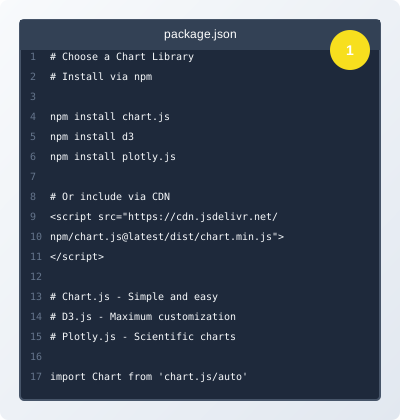
Choose a Chart Library

JavaScript Chart Libraries Comparison

Select the appropriate JavaScript charting library based on your requirements. Popular options include Chart.js for simplicity, D3.js for customization, and Plotly.js for scientific applications.

  • Chart.js - Simple and easy to use
  • D3.js - Maximum customization
  • Plotly.js - Scientific and statistical
  • Include library via CDN or npm
2

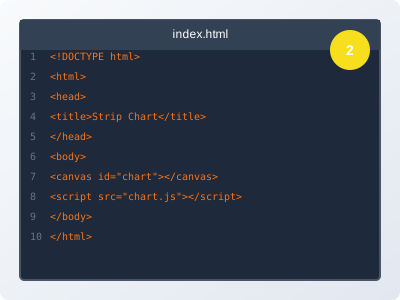
Set Up HTML Structure

HTML Canvas Element Setup

Create the HTML structure with a canvas element or container div for the chart. Set up the basic HTML page with proper meta tags and responsive design.

  • Create HTML file with proper structure
  • Add canvas element or container div
  • Include chart library via script tag
  • Set up responsive CSS
3

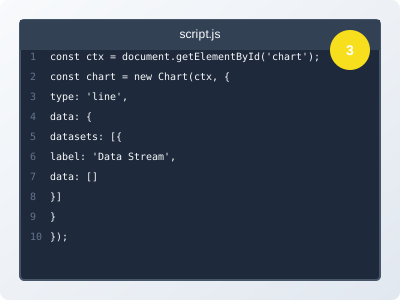
Initialize Chart with Configuration

Chart Initialization Code

Initialize the chart with proper configuration for strip chart mode. Set up data arrays, chart options, and real-time update mechanisms.

  • Create chart instance
  • Configure chart options
  • Set up data arrays
  • Configure animation settings
4

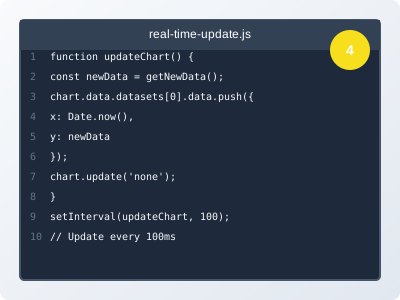
Implement Real-time Data Updates

Real-time Update Implementation

Implement real-time data updates using timers, WebSocket connections, or AJAX requests. Handle data buffering and chart updates efficiently.

  • Set up data update interval
  • Implement data buffering
  • Handle chart updates
  • Add error handling
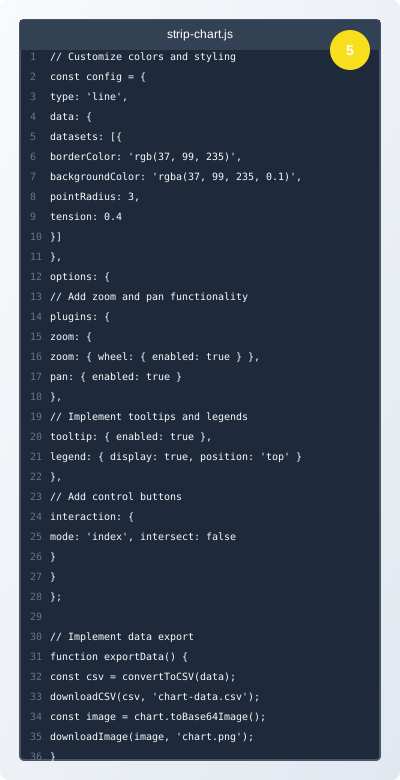
5

Add Interactivity and Customization

Interactive Strip Chart Features

Enhance the strip chart with interactive features like zoom, pan, tooltips, legends, and custom styling for a professional appearance.

  • Add zoom and pan functionality
  • Implement tooltips and legends
  • Customize colors and styling
  • Add control buttons
  • Implement data export

JavaScript Code Examples and Applications

Practical code examples and real-world applications for JavaScript strip charts

Chart.js Strip Chart Implementation

// Chart.js Strip Chart Implementation
const ctx = document.getElementById('stripChart').getContext('2d');
const chart = new Chart(ctx, {
    type: 'line',
    data: {
        datasets: [{
            label: 'Real-time Data',
            data: [],
            borderColor: 'rgb(37, 99, 235)',
            backgroundColor: 'rgba(37, 99, 235, 0.1)',
            tension: 0.1,
            fill: false
        }]
    },
    options: {
        responsive: true,
        animation: {
            duration: 0
        },
        scales: {
            x: {
                type: 'linear',
                position: 'bottom',
                title: {
                    display: true,
                    text: 'Time'
                }
            },
            y: {
                title: {
                    display: true,
                    text: 'Value'
                }
            }
        },
        plugins: {
            legend: {
                display: true
            }
        }
    }
});

// Update function for real-time data
function updateStripChart(newData) {
    const now = Date.now();
    chart.data.datasets[0].data.push({
        x: now,
        y: newData
    });
    
    // Keep only last 100 points
    if (chart.data.datasets[0].data.length > 100) {
        chart.data.datasets[0].data.shift();
    }
    
    chart.update('none');
}

// Start real-time updates
setInterval(() => {
    const newData = Math.sin(Date.now() * 0.001) + Math.random() * 0.5;
    updateStripChart(newData);
}, 100);

Explanation:

This Chart.js implementation creates a simple strip chart with real-time updates. The chart automatically maintains a rolling window of data points and updates smoothly without animation for better performance.

D3.js Custom Strip Chart

// D3.js Custom Strip Chart Implementation
class D3StripChart {
    constructor(container, width = 800, height = 400) {
        this.width = width;
        this.height = height;
        this.data = [];
        this.maxPoints = 100;
        
        // Create SVG
        this.svg = d3.select(container)
            .append('svg')
            .attr('width', width)
            .attr('height', height);
        
        // Create scales
        this.xScale = d3.scaleLinear()
            .domain([0, this.maxPoints])
            .range([0, width]);
        
        this.yScale = d3.scaleLinear()
            .domain([-1, 1])
            .range([height, 0]);
        
        // Create line generator
        this.line = d3.line()
            .x((d, i) => this.xScale(i))
            .y(d => this.yScale(d))
            .curve(d3.curveLinear);
        
        // Add path element
        this.path = this.svg.append('path')
            .attr('fill', 'none')
            .attr('stroke', '#2563eb')
            .attr('stroke-width', 2);
    }
    
    update(newValue) {
        this.data.push(newValue);
        if (this.data.length > this.maxPoints) {
            this.data.shift();
        }
        
        // Update path
        this.path.datum(this.data)
            .attr('d', this.line);
    }
}

// Usage
const chart = new D3StripChart('#chart-container');
setInterval(() => {
    const newValue = Math.sin(Date.now() * 0.001) + Math.random() * 0.2;
    chart.update(newValue);
}, 50);

Explanation:

This D3.js implementation provides complete control over the strip chart appearance and behavior. It creates a custom SVG-based chart with smooth animations and efficient data updates.

Multi-Channel Strip Chart

// Multi-Channel Strip Chart with Chart.js
const ctx = document.getElementById('multiChannelChart').getContext('2d');
const chart = new Chart(ctx, {
    type: 'line',
    data: {
        datasets: [
            {
                label: 'Temperature',
                data: [],
                borderColor: 'rgb(239, 68, 68)',
                backgroundColor: 'rgba(239, 68, 68, 0.1)',
                tension: 0.1
            },
            {
                label: 'Pressure',
                data: [],
                borderColor: 'rgb(34, 197, 94)',
                backgroundColor: 'rgba(34, 197, 94, 0.1)',
                tension: 0.1
            },
            {
                label: 'Flow Rate',
                data: [],
                borderColor: 'rgb(59, 130, 246)',
                backgroundColor: 'rgba(59, 130, 246, 0.1)',
                tension: 0.1
            }
        ]
    },
    options: {
        responsive: true,
        animation: { duration: 0 },
        scales: {
            x: { type: 'linear', position: 'bottom' },
            y: { beginAtZero: true }
        },
        plugins: {
            legend: { display: true },
            tooltip: { mode: 'index', intersect: false }
        }
    }
});

// Multi-channel update function
function updateMultiChannelChart(temperature, pressure, flowRate) {
    const now = Date.now();
    
    chart.data.datasets[0].data.push({ x: now, y: temperature });
    chart.data.datasets[1].data.push({ x: now, y: pressure });
    chart.data.datasets[2].data.push({ x: now, y: flowRate });
    
    // Keep only last 100 points per channel
    chart.data.datasets.forEach(dataset => {
        if (dataset.data.length > 100) {
            dataset.data.shift();
        }
    });
    
    chart.update('none');
}

Explanation:

This multi-channel implementation demonstrates how to display multiple data streams simultaneously with different colors and independent scaling, perfect for monitoring multiple parameters.

JavaScript Strip Chart Applications

See how JavaScript strip charts are used in actual web applications

IoT Dashboards

IoT Monitoring Dashboards

JavaScript strip charts are widely used in IoT applications to monitor sensor data in real-time, providing interactive dashboards for smart homes, industrial monitoring, and environmental sensing.

  • Real-time sensor data visualization
  • Multi-device monitoring
  • Interactive data exploration
  • Mobile-responsive design

Financial Analytics

Financial Analytics Platforms

Financial institutions use JavaScript strip charts to display real-time market data, stock prices, trading volumes, and economic indicators for investment analysis and trading platforms.

  • Real-time market data
  • Interactive trading charts
  • Portfolio performance tracking
  • Risk assessment visualization

Healthcare Monitoring

Healthcare Monitoring Systems

Healthcare applications use JavaScript strip charts to monitor patient vital signs, medical device readings, and treatment progress in real-time for improved patient care.

  • Patient vital signs monitoring
  • Medical device data visualization
  • Treatment progress tracking
  • Alert and notification systems